
Choosing a smart home voice assistant means deciding which system will make daily control simpler across your lights, plugs, thermostats, speakers, and other devices. Amazon Alexa and Google Assistant are the two familiar choices for many households, but they serve different priorities: Alexa tends to offer broader compatibility and more ways to build routines, while Google Assistant fits naturally into Google services and handles general questions well. Alexa is the stronger starting point for a mixed-brand smart home or a household that wants extensive automation. Google Assistant makes more sense when phones, calendars, and media already run through Google. Neither choice guarantees that every device will work: check the exact model and its current platform support before buying.

Get home appliances delivered free with Prime
- Fast, free delivery on millions of items
- Prime Video, Amazon Music and more included
- Member-only deals all year

Amazon Echo Show 5 Smart Display, Charcoal
- ✔ Display: 5.5-inch touchscreen
- ✔ Camera: 2 MP, with built-in shutter
- ✔ Speaker: 1.75-inch full-range built-in speaker
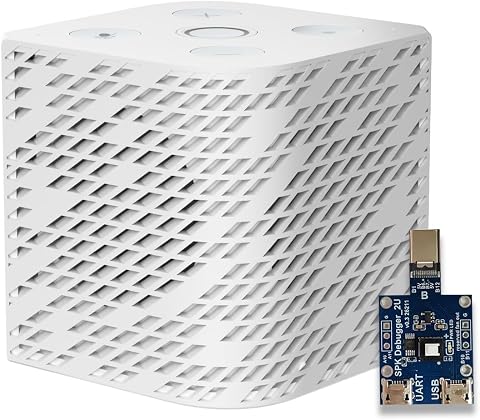
Third Reality Voice/Music Assistant Dev Edition for Home Assistant
- ✔ Operating system: Linux
- ✔ Processor: Quad-core ARM A53
- ✔ Memory: 256 MB RAM
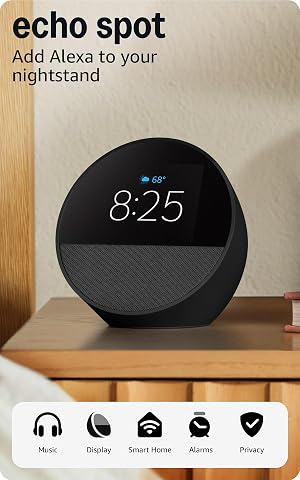
Amazon Echo Spot Smart Alarm Clock with Alexa, Black
- ✔ Display: 2.83-inch touchscreen, 240 × 320 pixels
- ✔ Camera: None
- ✔ Wi-Fi: Dual-band 802.11a/b/g/n/ac (2.4 and 5 GHz)
At a Glance
| Criteria | Amazon Alexa | Google Assistant | Winner |
|---|---|---|---|
| Device compatibility | Broad selection of compatible devices; check specific models and features | Strong support for mainstream devices, with compatibility varying by model | A |
| Routines and automation | Flexible routines and many device-trigger combinations | Capable routines, though available actions and triggers can be more limited | A |
| Everyday questions | Useful general answers, shopping, and Amazon services | Strong fit for conversational questions and Google search | B |
| Google service integration | Works with Google services, but not as natively as Google Assistant | Natural fit for Google Calendar, Maps, Search, and other Google services | B |
| Privacy controls | Voice history and settings can be reviewed and managed in Amazon account controls | Activity controls and history settings are available through Google account controls | Depends |
| Hardware and ecosystem value | Many Echo device choices and frequent discounts; features vary by model | Nest speakers and displays integrate with Google services; pricing and availability vary | Depends |
Amazon Echo Show 5 Smart Display, Charcoal
The Echo Show 5 is the strongest fit for households that want voice control and a screen in one compact device. Alexa can manage compatible smart home devices, while the 5.5-inch touchscreen makes news, media, and compatible camera or doorbell views easier to check without reaching for a phone. That extra visual layer gives it broader utility than the Echo Spot, whose smaller display is oriented around the clock and bedside information.Its 2 MP camera supports video calls, and a built-in shutter plus microphone and camera controls offer direct ways to limit access. Those features matter if the device sits in a shared room, though buyers who do not want a camera near them may prefer the camera-free Echo Spot. The Echo Show 5 also has a larger full-range speaker than the Third Reality’s 3W unit, but it remains a compact smart display rather than a dedicated room-filling audio system.Alexa’s broader out-of-the-box role is also the main reason to choose this over the Third Reality speaker: it does not require a Home Assistant host to deliver its described Alexa features. The compromise is ecosystem and service dependence. Some skills and services may require subscriptions or other fees, and the device does not support ad-hoc Wi-Fi networks. For a buyer who wants visual feedback, calls, and household controls together, it is the most balanced option in this lineup.
Pros:
- 5.5-inch touchscreen adds useful visual feedback to Alexa voice control.
- Camera supports video calls and includes a physical shutter.
- Can control compatible smart home devices and view supported cameras or doorbells.
- Uses recycled materials and recyclable packaging.
Cons:
- Does not support ad-hoc or peer-to-peer Wi-Fi networks.
- Some skills and services may require subscriptions or other fees.
- Camera-equipped design may not suit every room or privacy preference.
Best for: Alexa households that want one compact device for voice-controlled smart home routines, video calls, and glanceable information.
Not ideal for: Home Assistant users seeking a configurable endpoint, or buyers who do not want a camera-equipped device.
Bottom line: For the broadest mix of Alexa smart home control and useful screen features in this comparison, we would start with the Echo Show 5.
“For the broadest mix of Alexa smart home control and useful screen features in this comparison, we would start with the Echo Show 5.”
Third Reality Voice/Music Assistant Dev Edition for Home Assistant
The Third Reality Voice/Music Assistant has a narrower purpose than either Echo: it is a compact voice capture and playback device for a Home Assistant setup. It arrives preloaded with Home Assistant Voice Assistant and Music Assistant, so its defining value is how it fits into that environment, not a general-purpose display experience. Compared with the Echo Show 5, there is no screen or video calling; compared with the Echo Spot, it does not center on alarms and clock faces.Its dual digital microphones support wake-word or button-activated capture, and the built-in speaker can play TTS, streamed music, and system audio. This makes it a plausible endpoint for voice interactions and spoken feedback around the home. The flexibility to flash firmware, inspect live logs, and edit on-device will appeal to users who want to tune their setup. Those same options signal a more hands-on product than Alexa’s ready-made household experience.The key limitation is architectural: voice audio is processed through a Home Assistant host, so this is not a standalone assistant. We should choose it only if we already run, or intend to run, Home Assistant and are comfortable managing that dependency. Its 3W speaker and 2.4 GHz-only Wi-Fi also make it less appealing as a main music speaker or for a network that relies on 5 GHz coverage. Against the Echo devices, its advantage is customization within Home Assistant; its cost is dependence on that system and a smaller, simpler audio role.
Pros:
- Preloaded with Home Assistant Voice Assistant and Music Assistant.
- Dual digital microphones support wake-word or button-activated voice capture.
- Built-in speaker handles TTS, streamed music, and system audio.
- Firmware flashing, live logs, and on-device editing support customization.
Cons:
- Requires a Home Assistant host for voice audio processing.
- Wi-Fi is limited to 2.4 GHz.
- 3W speaker is modest for music playback.
Best for: Home Assistant owners who want a configurable voice endpoint for voice capture, TTS, and Music Assistant playback.
Not ideal for: Buyers seeking a standalone assistant, a visual display, or a stronger speaker for primary music listening.
Bottom line: For a Home Assistant household that values configurable voice capture over an all-in-one Alexa display, this is the specialist pick.
“For a Home Assistant household that values configurable voice capture over an all-in-one Alexa display, this is the specialist pick.”
Amazon Echo Spot Smart Alarm Clock with Alexa, Black
The Echo Spot is the most focused choice here: an Alexa smart home assistant shaped around the bedside table. Its 2.83-inch touchscreen shows the time, weather, and song titles, while Alexa routines can combine gradual light and music for a more tailored wake-up. That clock-first role distinguishes it from the Echo Show 5, which offers more screen space and a camera for calls, and from Third Reality, which is designed around Home Assistant rather than bedside habits.For a smaller nightstand, the Spot brings familiar Alexa voice control without adding a camera. Its camera-free design may suit buyers who want a screen but do not need video calls; the Echo Show 5 is the better match if calls and viewing compatible camera feeds matter. The built-in speaker supports music, podcasts, and audiobooks, and compatible eero owners can use it to extend network coverage, subject to router compatibility and setup.The tradeoff is that the display has a specific job. At 240 × 320 pixels, it is suited to glanceable clock information, not the richer viewing experience offered by the Echo Show 5. The Spot also remains part of the Alexa ecosystem, whereas the Third Reality device is the relevant alternative for Home Assistant users who want configurable capture. Its eero extension feature is a bonus only for a compatible eero household; it should not drive the choice if the network setup does not qualify. Pick it for routines and compactness, not as the most capable screen or the most flexible assistant.
Pros:
- Small touchscreen shows clock faces, weather, and song titles.
- Alexa routines can combine gradual light and music for waking.
- No camera, while still providing a display and voice control.
- Can extend a compatible eero network when configured with a compatible router.
Cons:
- Small, low-resolution display is less versatile than the Echo Show 5 screen.
- eero extension requires a compatible router, account linking, and app setup.
- Does not support ad-hoc Wi-Fi networks.
Best for: Alexa users who want a compact bedside clock with voice-controlled routines, music, and quick on-screen updates.
Not ideal for: Buyers who need video calls, a larger display, Home Assistant customization, or eero-independent mesh extension.
Bottom line: We would choose the Echo Spot for an Alexa bedside routine where a clock display matters more than video calls or a larger screen.
“We would choose the Echo Spot for an Alexa bedside routine where a clock display matters more than video calls or a larger screen.”
As an Amazon Associate we earn from qualifying purchases.
Key Differences
The biggest practical split is breadth versus fit. Alexa is often easier to build around when a home contains devices from several brands or when you want to connect actions into routines. That flexibility can reduce the number of separate apps you need, but compatibility is not universal: some products expose only basic controls, and support can change. Google Assistant can control many common smart home devices too, yet its clearest advantage is the way voice control sits alongside Google services. If your household already uses Google Calendar, Search, or Android, it may feel like a more natural extension of what you already do.
For everyday use, Google tends to suit people who ask varied questions or want answers connected to Google services. Alexa remains a capable assistant, with useful shopping and Amazon features, and it is often the more adaptable choice for custom home routines. Privacy is not a simple platform win: both systems involve cloud services and account settings, and both offer controls for managing voice activity. The useful comparison is how comfortable you are with each provider’s data practices and how easy you find its controls. Your existing devices, the routines you actually need, and your comfort with account settings matter more than a general claim that one assistant is always smarter or safer.
Detailed Comparison
Device compatibility (Amazon Alexa wins — moderate)
Alexa wins, with a moderate advantage. Alexa has broad support across the smart home market, which helps when you are combining devices from different manufacturers. Google Assistant supports many popular devices, but a particular feature may work with one assistant and not the other. Check the product listing for the exact model and the actions you need; a connection for basic on/off control does not promise every advanced feature.
Routines and automation (Amazon Alexa wins — moderate)
Alexa wins for flexibility, by a moderate gap. Its routines can link voice commands and smart home actions in useful combinations, making it a strong choice for lights, plugs, and other recurring tasks. Google routines cover common needs, but the available triggers and actions can feel less flexible. If your goal is a simple “good night” command, either can work; if you want a more tailored sequence, Alexa is the safer first choice.
Everyday questions (Google Assistant wins — moderate)
Google Assistant wins by a moderate margin. Its connection to Google Search makes it a natural fit for general questions, follow-ups, and requests that call for current information. Alexa can answer many everyday queries, but it is more compelling when the request connects to home controls or Amazon services. For someone who mostly asks for weather, facts, and information, Google is the better match.
Google service integration (Google Assistant wins — major)
Google Assistant wins clearly for Google households. Calendar, Search, and other Google services fit its ecosystem more directly, so voice requests can follow existing habits. Alexa can connect with some Google services and third-party options, but that may require extra setup and the experience can differ. This is a major practical advantage if the household depends on Google every day, and a minor one if it does not.
Privacy controls (moderate difference)
Neither has a universal advantage; the winner depends on your preferences and account setup. Amazon and Google provide account controls for reviewing or managing voice activity, but their menus, defaults, and wider data practices differ. The gap is moderate because these controls affect a sensitive part of using a voice assistant. Before choosing, review the current settings and decide which account ecosystem you are more comfortable using at home.
Hardware and ecosystem value (minor difference)
It depends on what you already own. Echo devices come in multiple formats and are often discounted, which can make Alexa a lower-cost entry point for adding voice control. Nest hardware is a stronger value when its Google integration is useful to you. Prices and features vary by model and region, so compare the device you intend to buy rather than treating either brand as the cheaper option overall. Paying extra for a screen or speaker upgrade makes sense only if you will use that specific feature.
Amazon Alexa: Pros and Cons
Pros:
- Broad compatibility with many smart home brands
- Flexible routines for connecting repeated actions
- Multiple Echo device formats and frequent sale pricing
Cons:
- Google services can require extra setup or offer a less direct experience
- Compatibility and advanced features still vary by device
- Amazon account and voice activity settings need attention
Google Assistant: Pros and Cons
Pros:
- Strong integration with Google services and Search
- Good fit for varied everyday questions
- Natural choice for households already using Google accounts and devices
Cons:
- Routine options may not match Alexa’s flexibility for every setup
- Device compatibility and features still depend on the exact model
- Nest hardware is less valuable if you do not use Google services
Who Should Choose What
Choose Amazon Alexa if:
- You have a mix of smart home brands and want broad compatibility.
- You want to build flexible routines for lights, plugs, and other devices.
- You prefer Echo hardware or can get an Echo device at a price that suits your budget.
Choose Google Assistant if:
- Your household uses Google services heavily, especially Calendar and Search.
- You expect to ask general questions as often as you control devices.
- You already own Nest or Google-compatible devices and want to keep the setup within that ecosystem.
Skip both if: Skip both if you do not want a cloud-connected assistant in your home, or if the devices you plan to use do not support either platform’s features you need.
Value for Money
For most first-time smart home buyers, Alexa offers better value when the goal is broad device control at a modest entry price, especially if an Echo speaker is discounted. That advantage matters only when the devices you own support the functions you want. Google Assistant is worth choosing even at a higher hardware price if Google integration or better answers will save you effort every day. Compare total cost against the features you will use: a more expensive display or speaker is poor value if voice control alone meets your needs. Avoid paying a premium based on brand reputation without checking the exact device, platform support, and current price.
Final Verdict
Choose Amazon Alexa for a mixed-brand smart home, flexible routines, and a lower-cost path into voice control. Choose Google Assistant if your household runs on Google services and general questions matter as much as device commands. For most buyers focused chiefly on adding control to a collection of smart home devices, Alexa is the stronger default because its compatibility and automation options give you more room to build the setup you want. The deciding factor is your actual ecosystem: Google users who rely on its services will likely be happier with Google Assistant. Check support for your exact devices before committing, since neither platform works identically with every product.
Frequently Asked Questions
Can Alexa and Google Assistant control the same smart home devices?
Many popular devices work with both, but support varies by exact model and feature. Confirm that the product supports the platform you plan to use, and check whether it offers the actions you need rather than only basic control.
Which is better for a smart home with devices from several brands?
Alexa is often the better starting point because it has broad compatibility and flexible routines. Still, check every key device: a mixed-brand home can include products with limited or different support across platforms.
Is Google Assistant better if I have an Android phone?
It is a natural fit for many Android users, especially if they also use Google Calendar and Search. Alexa can still control compatible devices from an Android phone, so your smart home needs should guide the choice too.
Should I pay more for a smart display?
Pay more only if you will use its screen for tasks such as viewing camera feeds, following visual information, or making video calls. If you mainly want voice commands and music, a compatible speaker may offer better value.